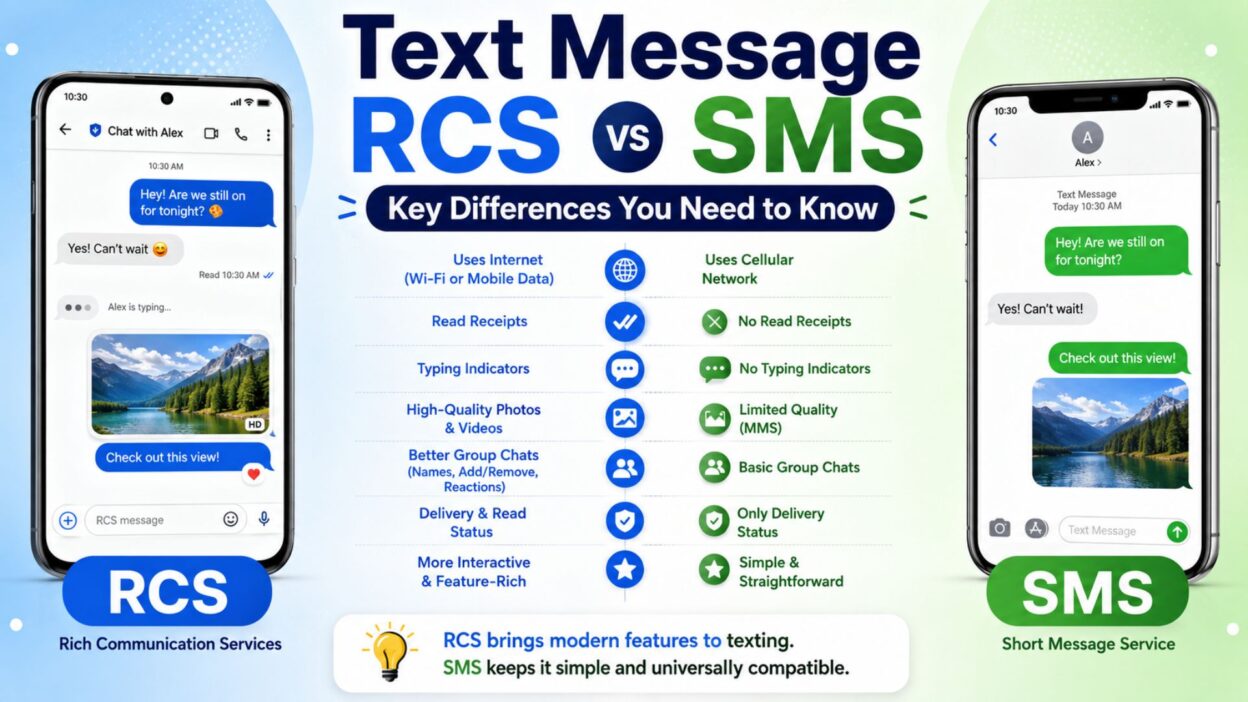
When you send a text, you probably do not stop to think about what technology delivers it. You type a message, tap send, and expect it to arrive. However, text message RCS vs SMS can make a noticeable difference in how that conversation works. One may offer typing indicators, read receipts, high-quality photos, and richer group chats, while the other keeps things simple.
SMS has been around for decades, so it remains widely supported. RCS, on the other hand, brings texting closer to the experience people expect from modern messaging apps. As a result, knowing the difference can help you understand why some conversations feel more interactive than others.
Whether you use Android, iPhone, or another device, this guide breaks down RCS and SMS in simple language. You will also find practical examples that make the differences easier to recognize.
Top Text Message RCS vs SMS Differences
RCS and SMS may look similar on the surface, but they work differently and offer different features. Here are some of the most useful differences to know.
- SMS is a basic texting standard, while RCS supports a richer messaging experience with additional features.
- RCS can support read receipts, so you may know when someone has opened your message.
- RCS can show typing indicators, letting you know when the other person is preparing a reply.
- SMS does not normally provide typing indicators, which keeps the experience much simpler.
- RCS can send higher-quality photos and videos, depending on the messaging service and connection.
- Traditional SMS has strict limits, so multimedia content may rely on MMS rather than standard SMS.
- RCS works through mobile data or Wi-Fi, while traditional SMS uses a cellular network.
- SMS can work without mobile data, which makes it useful when internet access is unavailable.
- RCS generally needs an internet connection, although the exact behavior depends on the messaging app and carrier.
- RCS can provide improved group chats, including features that are difficult to achieve with traditional SMS.
- SMS has extremely broad compatibility, making it useful when messaging people who use different phones or networks.
- RCS can offer a more app-like conversation, with richer media and interactive features.
- SMS is usually more straightforward, especially when you only need to send a short text.
- RCS may display delivery and read information, while basic SMS generally gives you less feedback.
- The availability of RCS depends on device, carrier, region, and messaging app support.
- SMS remains a dependable fallback, especially when RCS is unavailable.
Short Text Message RCS vs SMS Examples
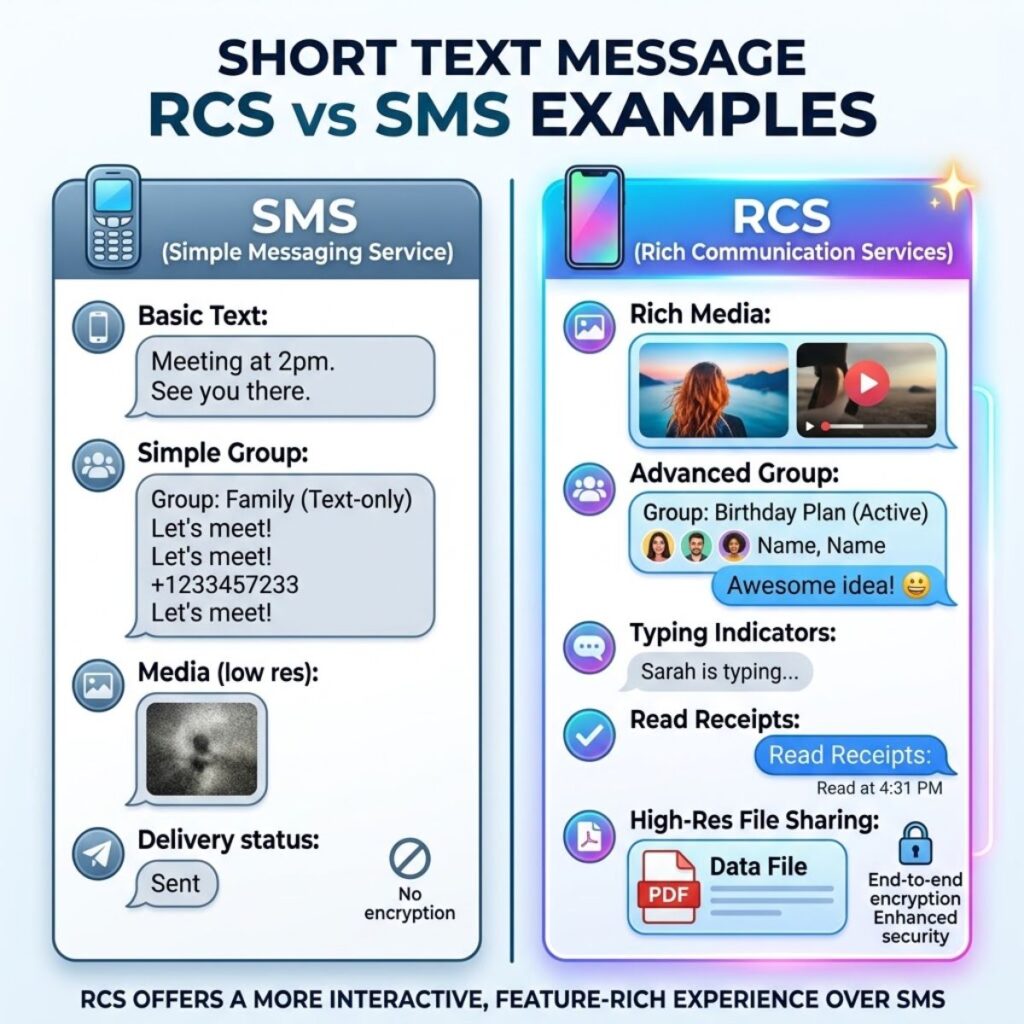
Sometimes the easiest way to understand the difference is to see how each technology fits into everyday conversations.
- SMS: “Hey, I’m outside.”
- RCS: “Hey, I’m outside. Let me know when you’re ready.”
- SMS: “Can you send me the address?”
- RCS: “Can you send me the address? I’m almost there.”
- SMS: “Did you get my message?”
- RCS: “Did you get my message? I can see you’re typing.”
- SMS: “I’ll send the photo.”
- RCS: “I’ll send the photo in full quality.”
- SMS: “What time should we meet?”
- RCS: “What time should we meet? I can see when you’ve read this.”
- SMS: “Thanks for letting me know.”
- RCS: “Thanks for letting me know! 👍”
- SMS: “Are you coming tonight?”
- RCS: “Are you coming tonight? Let me know when you see this.”
- SMS: “I’m running late.”
- RCS: “I’m running late. I’ll message you when I arrive.”
- SMS: “Can you call me?”
- RCS: “Can you call me when you’re free?”
- SMS: “Happy birthday!”
- RCS: “Happy birthday! 🎉 Hope you have an amazing day.”
- SMS: “Where are you?”
- RCS: “Where are you? I’m waiting near the entrance.”
- SMS: “I sent the details.”
- RCS: “I sent the details. Check them when you get a chance.”
- SMS: “See you soon.”
- RCS: “See you soon! 😊”
Why the Difference Matters
The biggest difference between RCS and SMS is not simply how a message looks. It is the overall communication experience.
With SMS, the goal is simple: send a text and deliver it through the cellular network. That simplicity is one reason SMS remains useful. It does not require the same type of internet connection that RCS typically needs.
RCS adds more modern features to traditional texting. Therefore, conversations can feel more interactive and informative. You may see when a message was delivered, when it was read, or when someone is typing.
However, RCS is not automatically available in every conversation. If the recipient, carrier, device, or messaging service does not support RCS, the conversation may fall back to another messaging method, such as SMS or MMS.
That is why understanding text message RCS vs SMS can help you avoid confusion when a message suddenly looks different or certain features appear in one conversation but not another.
Quick Takeaway
- SMS: Simple, widely compatible, and useful when internet access is unavailable.
- RCS: More modern, interactive, and capable of supporting richer messaging features.
- Best for basic texting: SMS remains a reliable choice.
- Best for richer conversations: RCS generally provides more features when supported.
- Important limitation: RCS availability depends on the devices, networks, apps, and regions involved.
Best Text Message RCS vs SMS Features for Everyday Use
RCS becomes especially useful when you want more than a basic text. These features can make everyday conversations smoother and more interactive.
- Read receipts can help you know whether your message has been opened.
- Typing indicators can show when the other person is preparing a response.
- High-quality media sharing can make photos and videos look better than traditional compressed messages.
- Better group conversations can make it easier to communicate with several people at once.
- Delivery information can give you more insight into whether a message reached the recipient.
- Wi-Fi messaging can allow RCS conversations when a suitable internet connection is available.
- Mobile data support makes RCS feel more like other internet-based messaging services.
- Richer conversations can make everyday texting feel less limited.
- SMS fallback can help keep a conversation going when RCS is unavailable, depending on the messaging service.
- Modern messaging features can reduce the need to switch between different communication apps.
Text Message RCS vs SMS for Photos and Videos
Photos and videos are one area where the difference becomes easy to notice. Traditional SMS itself is designed for text, while multimedia messaging has historically relied on MMS.
RCS can provide a more modern way to share media when both sides support it.
- SMS: Primarily designed for text.
- MMS: Commonly used when sending pictures or other multimedia through traditional carrier messaging.
- RCS: Can support richer media sharing through an internet connection.
- SMS/MMS: Media quality may be more limited depending on the carrier and messaging system.
- RCS: Can provide a better experience for sharing photos, videos, and other media.
- SMS: Remains useful when you simply need to send a short message.
- RCS: Makes more sense when a conversation includes frequent photos, videos, or group communication.
- SMS: Does not provide the same modern media experience associated with RCS.
- RCS: Can make media sharing feel closer to popular internet messaging apps.
- SMS/MMS: Compatibility remains one of its biggest advantages.
Best Text Message RCS vs SMS Choice for Different Situations
There is no single option that works best for every situation. The better choice depends on what you need from the conversation.
When SMS Makes More Sense
SMS can still be a practical option when reliability and broad compatibility matter most.
- When you have limited or no mobile data
- When the recipient does not support RCS
- When you need to contact someone using an older phone
- When you only need to send a short message
- When internet-based messaging is unavailable
- When you want a simple communication method
- When you are unsure which messaging features the recipient supports
- When basic compatibility matters more than extra features
When RCS Makes More Sense
RCS can be more convenient when both people have compatible devices and services.
- When you want read receipts
- When typing indicators are useful
- When you frequently share photos
- When you participate in group conversations
- When you want better media sharing
- When Wi-Fi or mobile data is available
- When you prefer a modern texting experience
- When you want more information about message delivery
- When you regularly have longer conversations
One-Line Text Message RCS vs SMS Comparisons
These quick comparisons make the differences easier to remember.
- SMS is simple; RCS is feature-rich.
- SMS focuses on basic texting; RCS expands the texting experience.
- SMS uses cellular messaging; RCS generally uses an internet connection.
- SMS offers broad compatibility; RCS offers more modern features.
- SMS is useful offline; RCS generally needs data or Wi-Fi.
- SMS keeps things basic; RCS adds interactive features.
- SMS is widely supported; RCS support depends on the messaging ecosystem.
- SMS is ideal for short texts; RCS is useful for richer conversations.
- SMS has limited multimedia capabilities; RCS provides a more modern media experience.
- SMS may provide less conversation feedback; RCS can provide delivery and read information.
- SMS works well for simple communication; RCS works well for feature-rich communication.
- SMS remains dependable; RCS feels more modern.
- SMS is familiar; RCS is more interactive.
- SMS prioritizes compatibility; RCS prioritizes enhanced messaging.
- SMS can be a fallback; RCS can be the richer primary experience when supported.
Best Messages for Captions
If you are explaining RCS and SMS on social media, these short captions can make the topic easier to share.
- RCS or SMS? The difference is bigger than you might think. 📱
- Same phone, different messaging experience.
- SMS keeps texting simple. RCS takes it a step further.
- Read receipts, typing indicators, and better media can change the way you text.
- Not every text message works the same way.
- RCS vs SMS: simple texting meets modern messaging.
- Wondering why some texts have more features? RCS may be the reason.
- Your messaging experience depends on more than just your phone.
- SMS is familiar. RCS is feature-rich.
- Before blaming your phone, check how your messages are being sent.
- RCS can make everyday texting feel much more interactive.
- SMS still matters, but modern texting has changed.
- Understanding RCS vs SMS makes confusing message features easier to understand.
- Two messaging standards, two very different experiences.
- Your next text might be more advanced than you realize.
Copy-Paste Ready Text Message RCS vs SMS Explanations
These messages are useful when someone asks you what RCS or SMS means and you want to explain it quickly.
- “SMS is the traditional texting system, while RCS provides a richer messaging experience with features such as read receipts and typing indicators.”
- “RCS is basically a more modern approach to carrier-based messaging, while SMS focuses on simple text delivery.”
- “SMS works through cellular networks, while RCS generally uses mobile data or Wi-Fi.”
- “If you see typing indicators or read receipts in a text conversation, the chat may be using RCS.”
- “RCS can provide better media sharing and group-chat features than traditional SMS.”
- “SMS is still useful because it has very broad compatibility and does not depend on the same internet connection as RCS.”
- “RCS offers more features, but whether you can use them depends on your device, carrier, region, and messaging app.”
- “Think of SMS as basic texting and RCS as a richer version of the traditional texting experience.”
- “RCS is useful when you want modern features, while SMS is helpful when you need simple and widely compatible messaging.”
- “The main difference between RCS and SMS is the number of features available during a conversation.”
RCS vs SMS: What Happens When RCS Is Not Available?
One common source of confusion is seeing a conversation switch between messaging technologies. You may start with RCS features and later notice that the conversation behaves differently.
This can happen because RCS requires compatible support on the devices, messaging services, and networks involved.
- If both sides support RCS, the conversation may use RCS features.
- If the recipient does not support RCS, the messaging service may use another method.
- If RCS is temporarily unavailable, the messaging app may offer another sending option.
- If internet connectivity is unavailable, RCS features may not work normally.
- If a carrier or region does not support a particular RCS setup, availability can vary.
- If the messaging app changes its connection status, the available features may change as well.
Therefore, a conversation looking different does not necessarily mean something is wrong with your phone. Messaging support can depend on several factors at the same time.
Why SMS Is Still Important
RCS receives attention because it brings modern features to texting. However, SMS remains an important part of mobile communication.
Its biggest advantage is simplicity. People can send traditional texts across a huge range of phones and networks without requiring the same RCS support.
SMS can also serve as a useful fallback in situations where richer messaging is not available. For example, someone may have an older device, limited data access, or a service that does not support RCS.
That broad compatibility explains why SMS has remained relevant even as newer messaging technologies have developed.
Why RCS Feels More Like Modern Messaging
RCS changes the expectations people have from ordinary texting. Instead of simply sending and receiving words, users can have a conversation with more feedback and richer media.
Typing indicators can make conversations feel more immediate. Read receipts can reduce uncertainty about whether someone saw a message. Better media support can also make sharing photos and videos more convenient.
As a result, RCS can feel closer to the experience people already know from dedicated messaging platforms.
Still, RCS does not completely replace SMS in every situation. Both technologies have different strengths, and the best experience depends on compatibility and connectivity.
Text Message RCS vs SMS: Which Is Better?
There is no universal winner because RCS and SMS solve slightly different problems. The right option depends on your device, network, messaging app, and the features you want.
- Choose RCS when you want typing indicators, read receipts, richer media, and improved group conversations.
- Choose SMS when you need broad compatibility and simple text messaging.
- Use RCS when you have a reliable Wi-Fi or mobile data connection and compatible messaging support.
- Use SMS when the recipient cannot use RCS or when internet-based messaging is unavailable.
- Prefer RCS for conversations that include frequent photos, videos, or group chats.
- Prefer SMS when a short, straightforward message is all you need.
- Remember that RCS availability varies, so the same phone may use different messaging methods with different contacts.
Text Message RCS vs SMS on Android
Android users may encounter both RCS and SMS depending on their messaging setup. RCS availability can depend on the messaging app, carrier, country, and the person receiving the message.
When RCS is available, a conversation can offer features that traditional SMS does not provide.
- RCS can show when someone is typing.
- RCS can support read receipts.
- RCS can improve photo and video sharing.
- RCS can provide richer group-chat functionality.
- SMS remains available for compatible traditional texting.
- The messaging app may determine which technology is used.
- A conversation can behave differently depending on the recipient’s setup.
- An internet connection is generally important for RCS features.
If you use Android and notice that one conversation has advanced features while another does not, the difference may come from RCS compatibility rather than a problem with your phone.
Text Message RCS vs SMS on iPhone
The messaging experience on iPhone can also involve different messaging technologies. Depending on the devices and services involved, conversations can use Apple’s messaging system, RCS, SMS, or MMS.
For example, an iPhone user may communicate with an Android user through RCS when the required support is available. If RCS is unavailable, the conversation may use another messaging method.
- RCS can improve communication between supported devices.
- SMS remains useful when RCS is unavailable.
- MMS may handle certain multimedia messages in traditional carrier messaging.
- The messaging method can affect available features.
- Different conversations may display different message capabilities.
- A change in message color or available features does not automatically indicate a phone problem.
- Device and service compatibility determines which features are available.
Because messaging technology continues to evolve, checking the current settings and support on your devices can help explain unexpected differences between conversations.
Frequently Asked Questions
What is the main difference between RCS and SMS?
The main difference is the messaging experience. SMS is designed for basic text communication, while RCS supports richer features such as typing indicators, read receipts, enhanced media sharing, and improved group conversations when supported.
Does RCS use Wi-Fi or mobile data?
RCS generally uses an internet connection, which can include Wi-Fi or mobile data. The exact behavior can depend on the messaging service, carrier, and device.
Can I send an SMS without internet?
Yes. Traditional SMS is designed to work through a cellular network, so it does not require the same type of internet connection that RCS normally needs.
Is RCS better than SMS?
RCS offers more features, so it can provide a better experience when both people have compatible support. However, SMS remains valuable because of its broad compatibility and simple operation.
Why did my message change from RCS to SMS?
A conversation may switch methods when RCS is unavailable or unsupported. Connectivity problems, recipient compatibility, carrier support, or messaging-service settings can affect which technology is used.
Final Thoughts on Text Message RCS vs SMS
Understanding text message RCS vs SMS makes everyday texting much less confusing. Although both technologies help people communicate through their phones, they provide different experiences. SMS focuses on simple, widely compatible text messaging, while RCS brings more modern features to supported conversations.
RCS can be especially useful when you want read receipts, typing indicators, richer media, or better group-chat functionality. However, SMS still has an important advantage: broad compatibility. It can also remain useful when an internet connection or RCS support is unavailable.
The good news is that you do not always have to choose one technology manually. Your messaging service may determine the best available method based on compatibility and connectivity.
So, if you ever wonder why one conversation has advanced features while another feels basic, the answer may simply be the messaging technology being used. Once you understand the difference, those little changes in your texting experience become much easier to recognize.
Save this guide for the next time someone asks, “Is this RCS or SMS?” 📱

Awais Bilal is the author of Messagesfy, sharing simple and meaningful messages, quotes, and wishes to help people express their feelings easily.