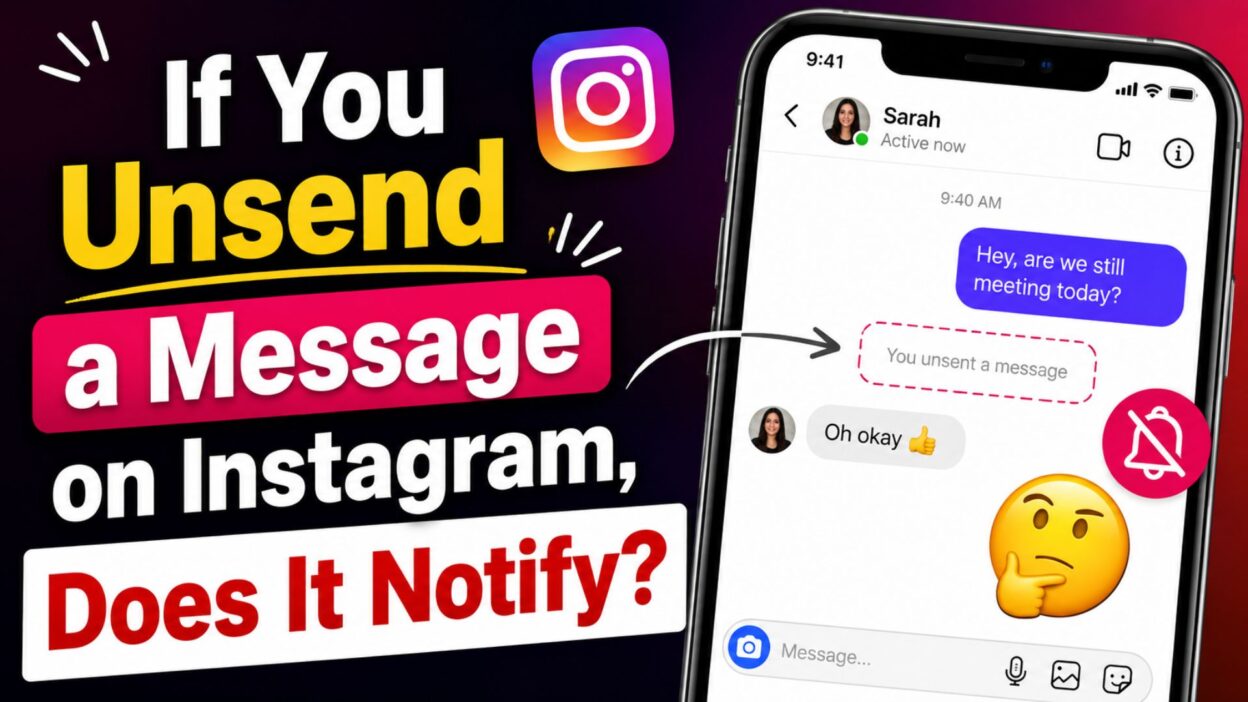
If you have ever sent a message on Instagram and immediately wished you could take it back, you are probably wondering: if you unsend a message on Instagram, does it notify the other person? It is an understandable question, especially when the message was sent by mistake or you simply changed your mind.
The good news is that Instagram does not normally send a separate notification saying that you unsent a message. When you use the unsend feature, the message is removed from the conversation for both you and the other person. However, there is an important catch: removing the message does not guarantee that the recipient never saw it.
They may have already opened the conversation, read the message, or noticed a notification preview before you unsent it. So, while the message can disappear from the chat, the moment itself cannot always be undone.
What Happens When You Unsend an Instagram Message?
- Instagram’s unsend feature removes the selected message from the conversation.
- The message is no longer normally visible in the chat to you or the other person.
- Instagram does not normally send a separate notification telling the recipient that you unsent the message.
- If the person had already read the message, unsending it will not erase what they already saw.
- If a notification preview appeared on their device, they may have seen part or all of the message before it was removed.
- Unsend is different from simply deleting a conversation from your own inbox because unsending removes the selected message from the chat itself.
Does Instagram Notify Someone When You Unsend a Message?
- No, Instagram generally does not send a separate notification saying that you unsent a message.
- The other person may notice that a message is no longer there if they return to the conversation.
- If they were looking at the chat while you unsent the message, they could notice that it disappeared.
- If they already saw the message, unsending it cannot make them forget what they read.
- A notification received before you unsent the message may also mean they already knew something had been sent.
Can Someone See an Unsent Instagram Message?
- Once a message has been successfully unsent, it should no longer appear in the conversation.
- However, unsending is not the same as preventing someone from seeing a message in the first place.
- If the recipient opened the chat before you unsent it, they could have already read it.
- If their phone displayed a message preview, they might have seen the content without opening Instagram.
- The safest way to think about unsending is that it removes the message from the chat, but it cannot reverse anything the recipient has already seen.
What If You Unsend a Message Right Away?
- If you notice a mistake immediately, unsending the message can prevent the message from remaining in the conversation.
- There is still no guarantee that the recipient did not see it first.
- They might have been using Instagram at the same time.
- They could also have received a notification before the message was removed.
- If the message was sent only moments ago, there is a chance they have not seen it, but you cannot know for certain.
Does Unsend Remove the Message for Both People?
- Yes, Instagram’s unsend feature is designed to remove the selected message from the conversation rather than simply hiding it from your own view.
- This means the message should no longer appear normally in the chat for the recipient either.
- Unsend is therefore useful when you accidentally send the wrong message, send something to the wrong conversation, or simply decide that you do not want the message to remain in the chat.
- Still, removing the message does not undo any screenshots, notification previews, or memories of the message that may already exist.
Can Someone Tell That You Unsent a Message?
- Instagram generally does not place a separate “message unsent” notification in the conversation.
- However, someone who remembers seeing a message may notice that it is suddenly missing.
- For example, they might have read your message and later opened the conversation again only to find that it is no longer there.
- They could reasonably assume that you removed it, even though Instagram did not send them a direct alert.
Why Do People Unsend Instagram Messages?
- Sending a message to the wrong person is one of the most common reasons.
- Some people unsend messages because they notice a spelling mistake or incorrect information.
- Others change their mind after sending something.
- A message may also have been sent accidentally because of an unintended tap.
- Whatever the reason, Instagram’s unsend feature gives users a way to remove a message from the conversation.
Quick Answer: If You Unsend a Message on Instagram, Does It Notify?
- Instagram does not normally send a separate notification when you unsend a message.
- The unsent message is removed from the conversation.
- The recipient may still have seen it before you removed it.
- A notification preview may have exposed the message before it was unsent.
- Someone can notice that a message disappeared if they had already seen it.
- Unsend removes the message, but it cannot undo something the other person already read or saved.
What You Should Remember
- The biggest thing to remember is that unsending a message is not the same as erasing the moment it was sent.
- If the recipient has not seen the message yet, unsending it may mean they never see it in the conversation.
- If they have already seen it, however, removing the message does not change that.
- So, if you are asking if you unsend a message on Instagram does it notify, the simple answer is no separate unsend notification is normally sent.
- The message can disappear quietly, but there is always a possibility that the person saw it before it disappeared.
Can You Unsend an Instagram Message After It Is Read?
- Yes, you can generally unsend a message even if the recipient has already read it.
- Once you unsend it, the message should disappear from the conversation for both sides.
- However, the recipient may already know what the message said.
- Seeing a message and having it remain in the chat are two different things.
- If someone already read your message, unsending it does not erase that memory.
- So, if you are worried about whether they received the message, check the situation before assuming that unsending means they never saw it.
Does Unsend Delete the Instagram Notification?
- If the recipient already received a notification before you unsent the message, removing the message does not guarantee that the notification or its preview disappears immediately.
- Notification behavior can depend on the person’s phone, notification settings, and timing.
- Someone may see a message preview without opening Instagram.
- They might also notice a notification before you have time to unsend the message.
- For this reason, it is better to think of unsending as removing the message from the Instagram conversation rather than recalling it from every place it may have appeared.
Does Instagram Show “You Unsent a Message”?
- Instagram generally does not add a permanent message bubble saying that you unsent something.
- The original message simply disappears from the conversation after it has been unsent.
- This means the other person may open the chat and find that the message is no longer there.
- If they remember seeing a message earlier, they may realize that you removed it.
- However, there is normally no separate alert that announces, “This person unsent a message.”
What If You Unsend a Message Before They Open Instagram?
- If you unsend a message before the recipient sees it, they may never see the message inside the Instagram conversation.
- However, timing still matters because a notification may have appeared before the message was removed.
- If no notification was seen and the message was unsent quickly, the recipient may not know that you sent anything.
- There is no reliable way to know exactly what another person’s phone displayed.
- That is why you should avoid assuming that unsending guarantees complete invisibility.
What If You Accidentally Send the Wrong Message?
- Don’t panic if you accidentally send a message to the wrong person.
- Open the conversation and use Instagram’s unsend option for the message you want to remove.
- After it is unsent, the message should no longer remain in the conversation.
- If the recipient has not seen it, they may never know what you originally sent.
- If they already saw it, you may still need to explain the mistake if necessary.
- A simple message such as “Sorry, that was sent by mistake” can clear up confusion without making the situation bigger than it needs to be.
Unsend vs. Delete: What’s the Difference?
- Unsend: Removes a specific message from the Instagram conversation.
- Delete chat: Removes the conversation from your own inbox but does not work the same way as unsending individual messages.
- If your goal is to remove one particular message from the chat, unsending is the relevant feature.
- Deleting the conversation from your inbox does not mean the other person loses their copy of the conversation.
- This distinction is important when you are trying to clean up an Instagram DM.
Can Someone Screenshot an Instagram Message Before You Unsend It?
- Yes, someone can potentially capture or save information before you unsend it.
- They could read the message and remember its contents.
- Depending on the type of content and Instagram’s features, they may also be able to capture what was shown on their device.
- Unsend cannot reverse something that has already been saved outside the message itself.
- Therefore, it is always best to treat anything you send online as potentially visible to the recipient.
Does Unsend Work for Instagram DMs?
- Yes, Instagram provides an unsend option for messages in direct conversations.
- The feature is useful when you want to remove a message that you no longer want in the chat.
- It can be especially helpful for accidental messages, incorrect information, or messages sent to the wrong conversation.
- The important point is that unsending affects the message in the chat, not necessarily everything that happened after the message was originally delivered.
When Should You Unsend a Message?
- Unsend a message when you notice that you sent it to the wrong person.
- You can also use it when you accidentally sent an incomplete or incorrect message.
- If the message contains information you no longer want displayed in the conversation, unsending may be appropriate.
- If you simply regret sending something, taking a moment before sending future messages can help avoid the same situation.
- Remember that unsending should not be treated as a guarantee that nobody saw the message.
Quick Tips Before You Send an Instagram DM
- Double-check the person’s name before tapping send.
- Read the message once more if it contains important information.
- Avoid sending sensitive information unless you are sure it is appropriate.
- If you are angry or emotional, consider waiting before sending.
- Remember that a notification may appear quickly after a message is sent.
- If you make a mistake, use the unsend feature as soon as you notice it.
Simple Examples of What Can Happen
- You send a message and immediately unsend it: The recipient may never see it, but there is no guarantee.
- You send a message and they read it first: They can still remember what the message said after you unsend it.
- They receive a notification preview: They may see some or all of the message before you remove it.
- They open the chat later: The unsent message should no longer appear there.
- They remember seeing something: They may realize that you removed a message even though Instagram did not send a separate unsend alert.
If You Unsend a Message on Instagram, Does It Notify? A Closer Look
- The short answer remains no, Instagram generally does not send a separate notification when you unsend a message.
- The message is removed from the conversation after you unsend it.
- The recipient can still know something happened if they saw the original message or received a notification before it was removed.
- This is why the exact timing of the unsend can matter.
- If you act quickly, you may prevent the message from remaining visible in the chat.
- But there is no feature that can guarantee the other person never saw the message.
What Happens After You Unsend?
- The selected message disappears from the conversation.
- You normally will not see that message in the chat anymore.
- The recipient should also no longer see that particular message in the conversation.
- Instagram does not normally send a dedicated notification announcing the unsend.
- However, the recipient could notice the missing message if they had already viewed the conversation.
- In other words, the message can be removed quietly, but the recipient’s previous experience cannot be undone.
The Most Important Thing to Know
- If you are searching if you unsend a message on Instagram does it notify, remember one simple rule: Instagram can remove the message from the chat, but it cannot guarantee that the person never saw it.
- There is normally no separate unsend notification.
- The biggest factor is whether the recipient saw the message before you removed it.
- If they did not see it, unsending may solve the problem without further interaction.
- If they did see it, removing the message simply means it is no longer visible in the conversation.
- That distinction can save you from unnecessary worry when dealing with accidental Instagram messages.
Before You Unsend: A Quick Reality Check
- Ask yourself whether the message was actually harmful or simply embarrassing.
- If it was a simple typo or accidental message, unsending may be enough.
- If the person has already read it, consider whether a short explanation would be more helpful.
- Avoid repeatedly sending and unsending messages because it can create more confusion.
- Most importantly, remember that accidental messages happen to everyone.
- Instagram’s unsend feature is there to give you more control over your conversations, even though it cannot turn back time.
Best Messages for Captions
- Wondering if you unsend a message on Instagram does it notify? Usually, no—but the person may still have seen it.
- Sent it. Regretted it. Unsent it. Instagram life happens. 😅
- Sometimes the best message is the one you decide not to leave in the chat.
- Unsend can remove a message, but it cannot erase what someone already saw.
- A missing message can say more than a long explanation.
- Double-check before sending, but remember that mistakes happen.
- One accidental tap can create a whole lot of overthinking.
- Unsent from the chat, but maybe not from their memory.
- When in doubt, pause before you hit send.
- Instagram lets you remove the message, not rewind time.
- Sometimes you just need the unsend button and a deep breath.
- The message disappeared, but the question remains: did they see it?
Copy-Paste Ready Messages
- “Sorry, that message was sent by mistake.”
- “Please ignore my last message—it was accidental.”
- “Oops, wrong chat! Sorry about that.”
- “I sent that before I was ready. Please ignore it.”
- “Sorry, I meant to send that somewhere else.”
- “That message wasn’t meant for you. My mistake!”
- “Please ignore the message I just sent.”
- “Oops! Wrong person. Sorry about that.”
- “I realized I sent the wrong message. Sorry!”
- “That was an accidental send. Please disregard it.”
- “Sorry, I didn’t mean to send that message.”
- “My mistake—I sent that to the wrong chat.”
- “Please don’t worry about my previous message. It was accidental.”
- “I noticed my mistake and removed the message. Sorry!”
- “Sorry for the confusion. I sent that by accident.”
Simple Things to Remember About Instagram Unsend
- Unsend removes the message: The selected message is removed from the Instagram conversation.
- No separate unsend alert: Instagram generally does not send a notification specifically telling someone that you unsent a message.
- They may have already seen it: If the recipient opened the chat or saw a notification preview, they may know what you sent.
- Timing matters: The sooner you unsend an accidental message, the less opportunity there may be for someone to see it.
- Unsend is not a time machine: Removing a message cannot undo something another person already read, remembered, or captured.
- The missing message may be noticed: Someone who already saw the message can realize that it has disappeared.
FAQ About Instagram Message Unsend
If you unsend a message on Instagram does it notify the other person?
- No, Instagram generally does not send a separate notification saying that you unsent a message.
- However, the person may already have seen the message or its notification preview before you removed it.
Does Instagram tell someone when you delete a message?
- Instagram’s unsend feature does not normally send a dedicated alert announcing that a message was removed.
- The person may still notice that something is missing if they had previously seen the message.
Can someone read an Instagram message after you unsend it?
- If the message was successfully unsent, it should no longer appear in the conversation.
- However, the recipient may have already read it before you removed it.
What happens if I unsend a message before someone reads it?
- The message should disappear from the conversation, and the person may never see it there.
- However, a notification preview could have appeared before you unsent the message, depending on their device and notification settings.
Does unsending a message remove it for both people?
- Yes, Instagram’s unsend feature is intended to remove the selected message from the conversation for both participants.
- It does not guarantee that the recipient never saw or saved the message beforehand.
Final Thoughts
- If you have been searching if you unsend a message on Instagram does it notify, the simplest answer is that Instagram generally does not send a separate notification telling the other person that you unsent a message.
- The message should disappear from the conversation, which makes the feature useful when you accidentally send something or change your mind.
- Still, there is one important limitation: the recipient may have already read the message or seen a notification preview before you removed it. Once something has been seen, unsending cannot completely reverse that moment.
- If you accidentally send a message, there is no need to panic. Unsend it as soon as you notice the mistake, then decide whether an explanation is actually necessary.
- Save this guide for the next time you are unsure about Instagram DMs, and share it with someone who has ever pressed Send a little too quickly.
- The message may disappear, but the best way to avoid regret is still to pause before you send.

Awais Bilal is the author of Messagesfy, sharing simple and meaningful messages, quotes, and wishes to help people express their feelings easily.