Messaging apps rely heavily on small visual cues to show communication status. Consequently, many users wonder what does two check marks mean on a text message when sending daily notes to friends or family.
These icon indicators give immediate feedback regarding whether your text successfully reached the recipient’s phone. Furthermore, understanding these symbols helps you avoid confusion during urgent conversations or daily catch-ups.
This comprehensive guide breaks down the exact meaning of double check marks across popular messaging platforms. In addition, you will learn how privacy settings, network connections, and app features affect your message status in real time.
Understanding Check Marks Across Popular Messaging Apps
Different messaging platforms use check marks to signal delivery and read status. However, each application treats these visual indicators slightly differently depending on its underlying infrastructure.
Because users frequently switch between apps like WhatsApp, Signal, and Telegram, recognizing platform differences prevents simple misunderstandings.
WhatsApp Check Mark Indicators
WhatsApp popularized the check mark delivery system across the mobile industry. Therefore, its system serves as the baseline standard for millions of smartphone owners worldwide.
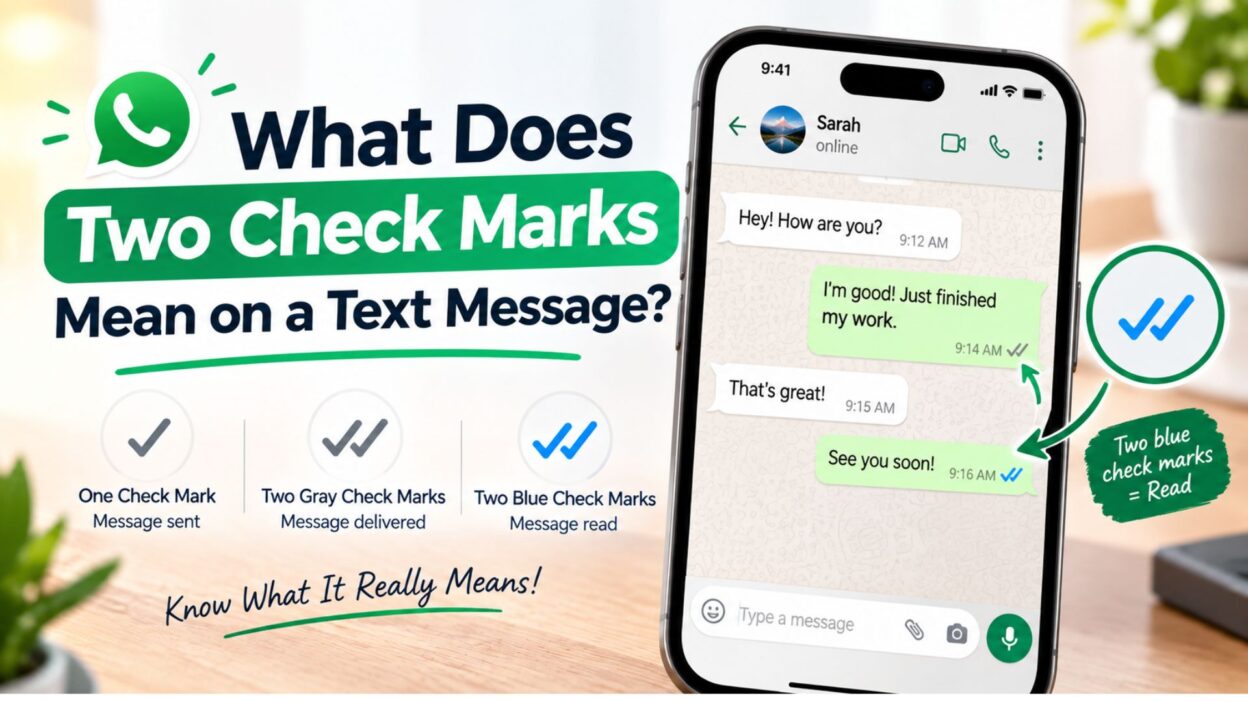
- Single Grey Check: The message left your phone successfully and reached WhatsApp cloud servers.
- Double Grey Checks: The message arrived on the recipient’s phone or connected active device.
- Double Blue Checks: The recipient opened your chat thread and read the text payload.
Signal Check Mark System
Signal focuses heavily on user privacy while maintaining clear status indicators. As a result, its interface uses clean circle icons to display delivery updates instantly.
- Single Check in Circle: The secure message reached Signal’s privacy-focused servers.
- Double Checks in Circles: The recipient’s phone received the encrypted message packet.
- Solid Colored Double Checks: The recipient read your encrypted message directly in the app.
What Two Grey Check Marks Mean for Your Text
When you see two grey check marks, your text has traveled across the network successfully. Therefore, the messaging server delivered the message payload directly to the receiving device.
However, grey check marks mean the recipient has not opened the app to view your specific chat yet. The phone received the data, but the user has not triggered a read receipt.
Message Delivery vs Message Reading
Many users confuse message delivery with message reading. Delivery means the phone hardware received the data packet through Wi-Fi or cellular networks.
In contrast, reading requires the user to tap the notification or open the chat thread. Thus, grey check marks confirm delivery while keeping read status open.
Why Messages Remain on Two Grey Checks
Sometimes a message remains on two grey checks for several hours or days. This delay usually happens due to personal habits or device notification settings.
- The recipient saw the lock screen notification banner but chose not to tap it open.
- The recipient enabled airplane mode to read incoming messages without sending read receipts.
- The user turned off read receipts entirely inside their account privacy settings menu.
- The recipient opened a different chat thread without tapping on your unread conversation.
What Two Blue Check Marks Mean in Chat Threads
Two blue check marks indicate that your recipient actively read your message. Once the user opens your chat window, the app updates the grey icons to bright blue instantly.
Besides basic reading confirmation, blue check marks offer helpful timing details inside chat settings. Users can swipe left on any blue-checked message to see exact delivery and read timestamps.
Group Chat Check Mark Dynamics
Group chats follow a slightly modified check mark delivery structure compared to one-on-one threads. Because multiple people participate in group chats, status updates depend on every individual member.
- Single Grey Check: The message reached the app servers successfully from your device.
- Double Grey Checks: Every single member in the group received the message on their phone.
- Double Blue Checks: Every single group participant opened the thread and read the message.
Managing Read Receipts for Privacy
If you prefer greater privacy, most platforms allow you to disable read receipts easily. Turning off this feature prevents others from seeing blue check marks on your messages.
However, disabling read receipts works both ways on most social platforms. Therefore, you will also lose the ability to see blue checks when others read your messages.
Quick Status Meaning Guide for Messaging Icons
Understanding quick icon meanings helps you track message progress instantly without guessing. Here is a clear breakdown of common status icons across major platforms:
- Single Grey Check: Sent to server successfully; waiting for recipient device connection.
- Double Grey Checks: Delivered to recipient phone; waiting for user to open chat.
- Double Blue Checks: Opened and read by recipient inside the active chat window.
- Clock or Timer Icon: Pending connection; waiting for active cellular or Wi-Fi data.
- Red Exclamation Mark: Delivery failed completely; tap icon to retry sending message payload.
Technical Factors Influencing Check Mark Updates
Several technical conditions affect how quickly check marks update on your screen. Network latency, server traffic, and OS background processing all play major roles in message delivery tracking.
Network and Connectivity Issues
Weak cellular connections frequently delay delivery receipts between devices. For instance, if the recipient enters a low-coverage zone, your text might sit on one grey check temporarily.
Once their phone reconnects to LTE or Wi-Fi, the server pushes the data through immediately. At that exact moment, your single check transforms into two grey check marks automatically.
Background Refresh Settings
Smartphone operating systems manage battery consumption by limiting background data refresh. If a user turns off background app refresh, incoming texts might delay until they open the app manually.
Consequently, your message remains on one check until their phone completes a background data sync. Adjusting background data permissions resolves these delivery delays effectively.
Differences Between Check Marks on Other Popular Apps
While WhatsApp and Signal popularized the double-check system, other communication platforms use unique visual symbols to confirm delivery and read status. Understanding how each platform displays these updates prevents confusion when switching between messaging applications.
Telegram Status System
Telegram simplifies its status indicators by focusing entirely on delivery and read states rather than server-only connections.
- Single Green Check: The message reached Telegram’s cloud servers and was delivered to the recipient’s phone as a notification.
- Double Green Checks: The recipient opened the conversation thread and read your message.
- Clock Icon: The message is currently queued on your phone, waiting for an active internet connection to upload.
Facebook Messenger Indicators
Facebook Messenger replaces traditional line-art check marks with small circular icons that track your message progress in real time.
- Empty Blue Circle: The app is actively attempting to send your message across the network.
- Blue Circle with a Blue Check: The message successfully left your device and reached Messenger servers.
- Filled Blue Circle with a White Check: The message was delivered directly to the recipient’s phone or active web browser.
- Profile Picture Icon: The recipient opened the chat thread and read your message.
Apple iMessage and Android RCS Messaging
Native phone messaging apps generally rely on plain text status labels instead of check mark graphics, although the underlying delivery logic remains similar.
- Delivered Status: A grey label beneath blue or green bubbles confirming the data reached the destination device.
- Read Status: A status label showing the exact time the recipient opened the text message thread.
- Sending / Pending: An empty space beneath the message bubble indicating the device is searching for network coverage.
Common Reasons a Message Stays on One Check Mark
If your text remains stuck on a single grey check mark for an extended period, the issue usually stems from the recipient’s phone status rather than a network error on your end.
Device and Connectivity Barriers
- Powered Off or Dead Battery: The recipient’s phone cannot receive network data packages until it powers back on.
- Airplane Mode Active: The user disconnected their phone from Wi-Fi and cellular towers to save battery or avoid interruptions.
- Out of Coverage Zone: The recipient is traveling through an area with no cellular service or internet connectivity.
- App Uninstalled: The user removed the messaging application from their smartphone, preventing data delivery entirely.
Privacy and Account Status Barriers
- Contact Blocked: If a user blocks your phone number or profile, your sent messages will stay on a single check mark indefinitely and never deliver.
- Server Maintenance: Temporary regional server outages can hold messages on a single check mark until network operations resume.
- Background Data Restraints: Low Power Mode on iOS or Battery Saver on Android can pause incoming message delivery until the user opens the application manually.
How to Fix Check Mark Delivery Issues
When your text messages experience unusual delivery delays or status icons fail to update, simple troubleshooting steps usually restore normal function.
Step-by-Step Troubleshooting for Delivery Statuses
- Check Your Internet Connection: Switch between Wi-Fi and mobile data to ensure your device maintains a strong network link.
- Restart the Messaging App: Force-close the application completely and reopen it to refresh server communication.
- Update the Application: Visit your phone’s app store to download the latest software updates and bug fixes.
- Reboot Your Device: Turn your smartphone off for 30 seconds and power it back on to clear temporary memory cache.
- Verify System Permissions: Ensure the messaging app has permission to use background data in your phone’s main settings menu.
Frequently Asked Questions
Can someone read a message without the check marks turning blue?
Yes. Users can read messages through lock screen notifications or banner previews without opening the app. Furthermore, disabling read receipts in account settings keeps check marks grey permanently even after reading the text.
Do two check marks mean my text was received if my contact blocked me?
No. If a user blocks your account or phone number, your sent messages will display only a single grey check mark. The second check mark will never appear because the server discards the message before reaching their phone.
Why did my message show two check marks and then disappear?
This rare issue occurs when a user deletes a message thread immediately or uninstalls the application right after receiving the payload. Network synchronization errors during server maintenance can also temporarily distort status icons.
Do check marks work the same way in group conversations?
No. In a group conversation, two grey check marks appear only after every single member receives the message. Similarly, two blue check marks require every participant in the group to open and view the chat thread.
Conclusion
Understanding what does two check marks mean on a text message empowers you to communicate with clarity across digital platforms. Whether you use WhatsApp, Signal, or Telegram, two check marks confirm that your message successfully reached the recipient’s phone, while blue checks verify that they opened the conversation.
By recognizing how device settings, airplane mode, and privacy preferences influence status icons, you can navigate your daily chats without unnecessary confusion. Keep these simple visual cues in mind during your daily text exchanges to track your communications seamlessly.

Awais Bilal is the author of Messagesfy, sharing simple and meaningful messages, quotes, and wishes to help people express their feelings easily.