Accidentally sending a text to the wrong person creates instant panic. Whether you spotted a glaring typo, attached the wrong file, or texted your boss instead of a friend, that momentary lapse can feel overwhelming. Fortunately, modern messaging platforms offer built-in features that let you retract your words quickly.
Understanding how to unsend a message gives you complete control over your digital conversations. Different apps use varying time limits, features, and settings, so acting fast makes all the difference. Knowing these steps ahead of time helps you handle accidental texts with confidence and ease.
This comprehensive guide covers exact steps for retracting texts across major platforms, including iMessage, WhatsApp, Instagram, and Messenger. You will learn the specific time limits for each platform, practical workarounds when recall options expire, and key tricks to prevent future texting mistakes.
Understanding How Unsending Works
When you trigger a recall command, your messaging app sends a quick deletion request to the central server. The system then removes the text data from both your screen and the recipient’s view. However, this process relies heavily on tight time limits and active internet connections.
Time Limits and Constraints
Every app sets its own strict window for recalling content. For example, some platforms give you mere seconds to act, while others allow several hours. If the recipient opens the notification before you complete the action, they will still see the original text. Therefore, speed remains your most critical advantage.
Recipient Notification Differences
Some platforms remove the text completely without leaving any trace behind. Conversely, other apps display a small system note stating that a message was deleted. While the recipient cannot read the original text, they will know you removed something from the conversation thread.
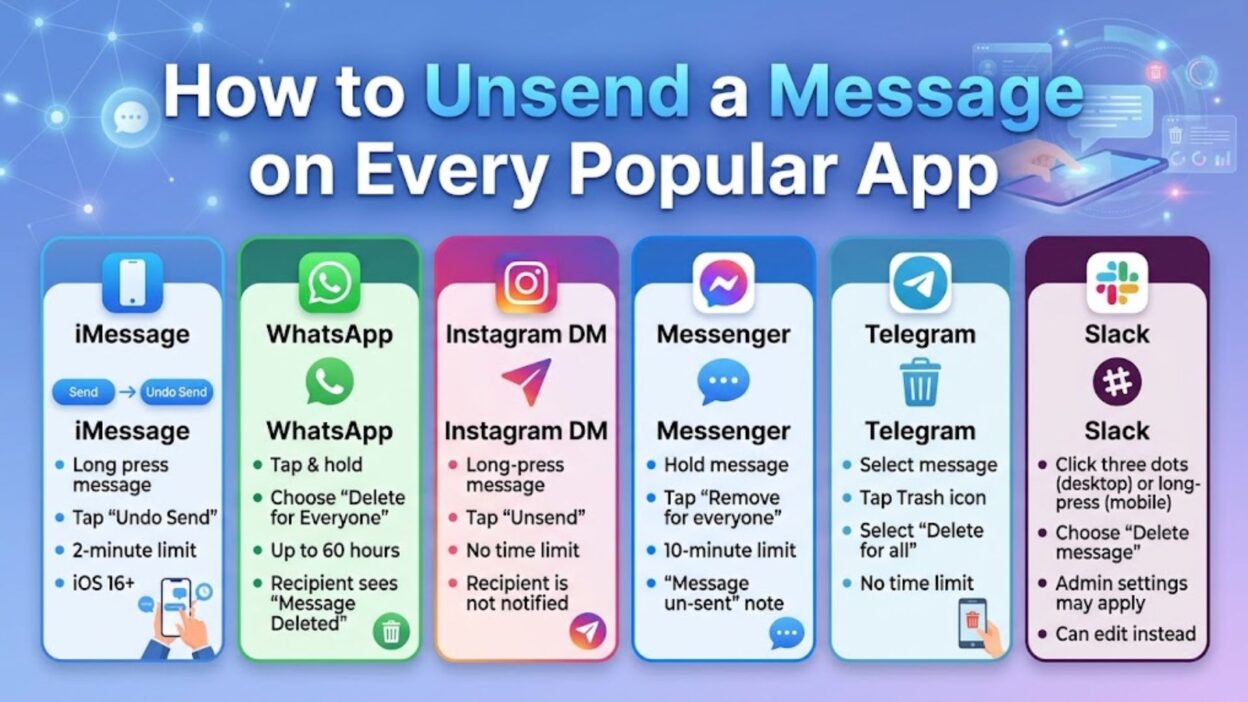
How to Unsend a Message on iMessage
Apple integrated a dedicated unsend feature into iOS 16, allowing iPhone users to retract accidental texts easily. However, both devices must run modern software for this system to function properly.
Steps for iPhone and iPad
Recalling a text on iOS requires only a few quick taps. Follow these simple steps immediately after sending the wrong text:
- Press and hold the specific message bubble you want to remove.
- Tap the Undo Send option from the pop-up context menu.
- Watch the message disappear from the thread with a small popping animation.
Important iMessage Time Limits
Apple allows exactly 2 minutes to unsend an iMessage after pressing send. Once those 2 minutes pass, the Undo Send option disappears entirely from your menu. Additionally, if the recipient uses an older iOS version, the text stays visible on their device despite your deletion attempt.
Recalling Messages on WhatsApp
WhatsApp provides a robust feature called “Delete for Everyone” across mobile and desktop applications. This tool removes text, images, videos, and voice notes from the chat history entirely.
Steps for Deleting WhatsApp Messages
You can easily wipe a mistake from a individual or group chat using these steps:
- Touch and hold the specific text until the options menu opens.
- Tap Delete from the list, then select the small trash icon.
- Choose Delete for Everyone to pull the content from all devices.
WhatsApp Time Frames and System Alerts
WhatsApp gives users roughly 60 hours (2 days and 12 hours) to retract a message. However, the app always leaves a visible placeholder reading “This message was deleted.” Because of this notice, the recipient will notice that you removed a text, even if they never read the original text.
How to Unsend Direct Messages on Instagram
Instagram provides one of the most flexible recall systems among modern social apps. You can remove any Direct Message (DM) at any point without leaving behind a visible placeholder.
Steps for Instagram DMs
Removing an embarrassing DM takes only a couple of seconds on both iOS and Android:
- Open the specific chat thread and locate the message.
- Tap and hold the message bubble until a menu appears.
- Select Unsend to delete the text from the chat immediately.
Why Instagram Unsend Is Unique
Unlike iMessage or WhatsApp, Instagram sets no official time limit for unsending DMs. You can easily remove a message sent five minutes ago or five months ago. Furthermore, Instagram quietly removes the text without dropping a “deleted message” notification inside the chat thread.
Retracting Messages on Facebook Messenger
Meta built a straightforward retraction system directly into Facebook Messenger. This tool helps you quickly manage mistaken texts across mobile phones, tablets, and desktop browsers.
Steps for Messenger App and Web
You can unsend content on Messenger by following these quick instructions:
- Long-press the message you want to recall, or click the three dots next to it on a desktop.
- Tap the Remove button at the bottom of your screen.
- Select Unsend for Everyone to remove the message from both sides.
Limitations of Messenger Recall
Messenger allows up to 10 minutes to unsend a message for everyone in the chat. If you miss that crucial 10-minute window, you can only choose “Unsend for You.” That secondary option cleans up your own screen, but it leaves the text visible to everyone else.
Recalling Messages on Telegram
Telegram stands out by offering total control over your digital footprint. The platform allows users to retract messages seamlessly across personal chats and large group channels without strict time boundaries.
How to Delete Telegram Messages
Clearing an accidental text on Telegram takes just a few quick taps on mobile or desktop:
- Tap and hold the message bubble you wish to recall.
- Select the trash can icon located in the upper corner of your screen.
- Check the box that says “Also delete for [Recipient’s Name]” before tapping Delete.
Telegram’s Unlimited Recall Window
Unlike platforms with rigid countdowns, Telegram imposes no time limit for unsending standard messages. You can remove a text sent minutes, days, or even years ago. Additionally, the app silently erases the message without leaving a “deleted message” placeholder in the chat thread.
How to Undo Sent Emails on Gmail
Accidental emails often carry higher stakes than casual text messages. Luckily, Google provides an automatic safety net through its popular “Undo Send” feature, giving you a brief window to stop an email mid-transit.
Setting Up the Recall Window
Gmail allows you to customize how long you have to retract an email before it permanently reaches the recipient. You can configure this setting easily on a computer:
- Open Gmail settings by clicking the gear icon in the top right corner.
- Select See all settings and locate the Undo Send section.
- Choose your preferred cancellation period from 5, 10, 20, or 30 seconds.
- Scroll to the bottom of the page and click Save Changes.
Retracting an Email in Real Time
Whenever you dispatch an email, a small pop-up banner appears at the bottom left of your screen. To stop the email, click the Undo button inside that banner before the timer expires. Gmail will immediately halt the delivery, recall the message, and re-open your original draft for editing.
How to Unsend Messages on Slack
Professional communication tools like Slack also include built-in options to fix mistakes, ensuring you maintain a clear and professional presence in workplace conversations.
Steps to Delete or Edit Slack Messages
Slack gives users the flexibility to either fix typos or remove messages entirely from channels and direct messages:
- Hover over the message on desktop or tap and hold it on a mobile device.
- Click the three vertical dots to open the options menu.
- Select Delete message to wipe it completely, or choose Edit message to correct your mistake on the spot.
Slack Workplace Restrictions
While Slack supports message deletion, individual workplace administrators can customize these settings. Some organizations set strict time limits for editing and deleting posts. In contrast, other companies disable the unsend feature entirely for compliance and record-keeping purposes.
Workarounds When You Miss the Unsend Window
If the official time limit expires, you can no longer pull a message off the recipient’s screen. However, you can still manage the situation using practical strategies to minimize confusion or awkwardness.
Quick Apologies and Clarifications
When a sensitive or confusing text cannot be recalled, swift communication helps resolve any misunderstanding. Send a brief, direct follow-up text acknowledging the mistake:
- “Please ignore that last message! It was meant for someone else.”
- “Sorry about the typo above, I meant to say tomorrow instead of today.”
- “Disregard my previous text, I sent that to the wrong chat thread.”
Deleting Messages for Yourself
Although removing a text “for yourself” does not erase it from the recipient’s phone, it helps declutter your own inbox. Every major platform offers a local delete option. This step prevents future confusion on your end and keeps your chat history clean and organized.
Proactive Tips to Avoid Sending Mistakes
Preventing accidental texts in the first place saves time and avoids awkward explanations. Adopting a few simple texting habits drastically reduces the risk of sending messages to the wrong contact.
Useful Texting Habits
- Double-check the recipient’s name at the top of the screen before tapping send.
- Read important or sensitive messages aloud to catch errors beforehand.
- Pause briefly before hitting send when responding during emotional moments.
- Pin your most frequent contacts to the top of your app to avoid mixing up chat threads.
Best Caption Messages for Social Media Mistakes
When you make a public posting error, a lighthearted caption helps break the tension and move past the moment. Here are quick, relatable captions you can share when a post or message goes sideways:
- Typing faster than my brain can process today.
- Please pretend you never saw that accidental post.
- Mistakes happen, but luckily the unsend button exists.
- Proofreading is a skill I am actively practicing.
- That awkward moment when your thumb acts faster than your head.
Copy-Paste Ready Quick Apologies
If you missed the unsend window, copy and paste one of these direct, natural messages to clear up any confusion right away:
- So sorry, please ignore my previous message! It was intended for a completely different conversation thread.
- Oops! Sent that to the wrong person. Please disregard it!
- Apologies for the confusion, my phone glitch sent that draft prematurely. Please ignore it.
- Caught a huge typo in my last message—disregard that and let me resend the correct details!
- Disregard my last note, sent it in a rush without checking the name!
Frequently Asked Questions
Can someone see a message if you unsend it immediately?
Yes, if the recipient already had their app open or saw the lock-screen push notification, they may read it before you hit unsend. However, recalling the message removes the text from the actual chat thread right away.
Does the recipient know when you unsend a message?
It depends on the platform. Apps like WhatsApp and Facebook Messenger leave a visible “message deleted” note in the chat thread. Conversely, platforms like Instagram and Telegram silently erase the text without leaving any trace.
Can you unsend a regular SMS text message?
No, traditional SMS messages travel directly over cellular networks, so you cannot unsend them once sent. Features like Undo Send only work on internet-based messaging platforms like iMessage, RCS, or chat apps.
Conclusion
Mastering how to unsend a message provides total peace of mind in our fast-paced digital world. Whether you rely on Apple iMessage, WhatsApp, Instagram, or email platforms, acting quickly ensures you can clean up communication errors before they cause unnecessary confusion. Time limits vary across apps, so knowing the exact steps for your favorite platforms helps you react swiftly whenever a slip-up occurs.
Even when you miss the recall window, clear communication and quick follow-up messages resolve misunderstandings gracefully. Developing simple habits like double-checking recipient names and reviewing text drafts further protects your digital conversations. Be sure to save this helpful guide for quick reference whenever you need to recall a text in a pinch.

Awais Bilal is the author of Messagesfy, sharing simple and meaningful messages, quotes, and wishes to help people express their feelings easily.