Texting remains one of the primary ways we stay connected every day. However, the technology behind our everyday text apps has evolved dramatically over recent years. While older systems served us well for decades, newer formats bring richer features to our mobile screens.
Understanding rcs vs sms message options helps you get the most out of your smartphone. Choosing the right messaging method directly impacts how you share photos, send group updates, and secure your personal chats.
This guide breaks down how these two texting standards compare, what features they offer, and how you can use them to improve your daily conversations.
Understanding the Basics of SMS Texting
Short Message Service, widely known as SMS, represents the classic text messaging standard that revolutionized mobile communication in the 1990s. Because it relies on cellular voice networks rather than cellular data or Wi-Fi, it works on virtually every mobile phone in existence.
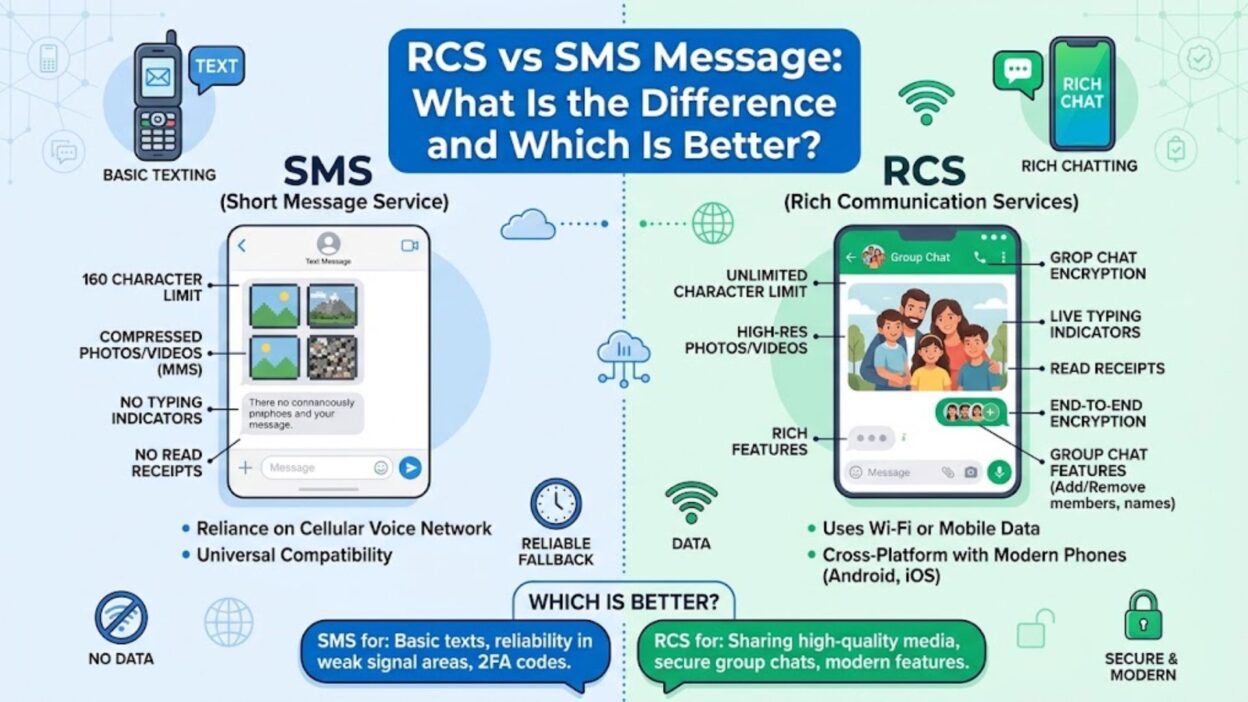
However, SMS carries noticeable technical constraints due to its legacy design. For instance, standard SMS messages cap your text at 160 characters. When you exceed this limit, your carrier breaks the note into smaller chunks or converts it into a Multimedia Messaging Service (MMS) payload.
How Traditional SMS Operates
- SMS routes data through your carrier’s cellular network signals rather than an internet connection.
- The system limits single texts to 160 plain-text characters without advanced formatting options.
- Delivery depends entirely on active cell service rather than mobile data or local Wi-Fi networks.
Common Limitations of Standard Texting
- You cannot see real-time typing indicators or read receipts through basic SMS channels.
- Media attachments require conversion to MMS, which drastically reduces image and video resolution.
- Group chats often split into individual threads or drop messages due to carrier incompatibilities.
What Is RCS Messaging?
Rich Communication Services, or RCS, serves as the modern upgrade to traditional SMS protocols. Google and major mobile carriers developed RCS to bring modern, internet-based chat features directly into your phone’s default texting application.
Instead of relying on legacy signal towers, RCS uses mobile data or Wi-Fi to send content. Consequently, it supports high-resolution photos, long audio notes, dynamic group interactions, and live status updates.
Key Features of Modern RCS
- You can send uncompressed high-definition images, videos, and large document files directly.
- Real-time typing bubbles and read receipts show you exactly when contacts view your messages.
- Integrated group chats allow members to add or remove participants and name group threads freely.
Requirements for Running RCS
- Both the sender and receiver must use a compatible messaging app like Google Messages or Apple Messages.
- Your device needs an active Wi-Fi connection or cellular data plan to transfer media and texts.
- Your mobile carrier must support RCS infrastructure, which almost all global carriers now do.
Comparing Features: RCS vs SMS Message Breakdown
When you evaluate an rcs vs sms message setup, the functional differences quickly become obvious during daily use. Traditional SMS handles basic text delivery reliably, but RCS turns your default messenger into a full-featured communication platform rivaling app-based chat tools.
Besides basic text transfer, RCS introduces essential security upgrades like end-to-end encryption for individual conversations. Therefore, your private information remains shielded from unauthorized access while in transit.
Media Quality and File Sharing
- RCS supports large files up to 100 megabytes without compressing your photos into blurry thumbnails.
- SMS relies on MMS protocols for media, forcing severe compression that ruins photo and video clarity.
- Document files like PDFs, spreadsheets, and audio clips transfer seamlessly over RCS connections.
Chat Management and Group Features
- RCS group threads operate smoothly with features for naming chats, mute controls, and easy member removal.
- SMS group threads frequently fracture, sending reply messages to individual private chats instead of the main thread.
- Online status indicators let you know when contacts remain available for real-time messaging.
Modern Status Updates and Delivery Tracking
Keeping track of your messages becomes far easier when you understand status indicators. Traditional SMS only tells you if a message left your device, offering minimal feedback on actual delivery. RCS gives you full visibility into the delivery pipeline.
Real-Time Status Benefits
- Delivered checkmarks confirm that your contact’s device successfully received your transmission.
- Read receipts show precisely when your recipient opened and viewed your text message.
- Active typing indicators prevent awkward overlapping texts by showing when someone is typing a reply.
Reliability Without Internet
- SMS functions effectively in remote areas where only basic cell towers provide signal coverage.
- RCS automatically falls back to standard SMS or MMS if your data connection drops suddenly.
- Your phone manages these fallbacks seamlessly so your communication stays connected without manual intervention.
Top RCS vs SMS Message Setup Quick-Start Tips
- Check your default messaging app settings to ensure chat features or RCS toggles remain switched on.
- Keep mobile data active or connect to Wi-Fi whenever you need to send large, high-quality media files.
- Verify that your frequent contacts also use RCS-enabled devices to enjoy seamless group features and encryption.
- Use Wi-Fi messaging options to send texts reliably even when you lack standard cellular coverage indoors.
Short RCS Messages for Daily Texts
- Checking in to see if your phone supports RCS chat features today!
- Switching over to internet messaging so we can share high-res photos easily.
- Let me know if you can see my typing status on your screen now.
- Sending this over Wi-Fi since my cell signal is weak indoors today.
Best RCS Messages for Sharing Media
- Here is the original photo file without any compression or blur!
- Sending over the full event video so you can watch it in high definition.
- Check out these high-resolution travel clips we captured on our trip this weekend.
- I just shared the project PDF file directly through our main chat thread.
Security and Encryption Differences
Security plays a crucial role when comparing an rcs vs sms message protocol. Traditional SMS technology lacks built-in encryption, leaving your messages visible to mobile operators or potential interceptors along the network path.
In contrast, modern RCS protocols incorporate end-to-end encryption (E2EE) for one-on-one and group chats within supported apps like Google Messages. Consequently, no third party—not even your carrier or operating system vendor—can read your message contents during transit.
Why SMS Security Lacks Modern Protection
- SMS transmits data as unencrypted plain text across legacy telecommunication networks.
- Cellular carriers store SMS logs on local servers, where security breaches could expose user texts.
- Legacy messaging systems remain vulnerable to SIM-swapping and network spoofing attacks.
How RCS Protects Your Personal Privacy
- End-to-end encryption scrambles your content before it leaves your phone until it reaches the recipient.
- Cryptographic keys verify that only authorized devices can unlock and render your conversation.
- Verified business profiles prevent scammers from impersonating legitimate companies or financial institutions.
Cross-Platform Support and Device Compatibility
Compatibility historically represented the biggest hurdle for RCS adoption across the smartphone ecosystem. Android devices embraced RCS early as their default standard, while Apple relied primarily on iMessage and standard SMS fallbacks.
However, recent system updates have introduced universal RCS support across iOS and Android platforms. Therefore, users can now enjoy rich messaging features across different operating systems without switching to third-party chat apps.
iPhone and Android Interoperability
- Cross-platform RCS restores high-quality media sharing between Android and iOS users without MMS compression.
- Group chats involving both Android and iPhone users retain rich features like typing bubbles and read receipts.
- Network fallbacks automatically route your text via standard SMS whenever data coverage drops out completely.
Carrier Support and Global Adoption
- Major telecom operators worldwide now natively support RCS profile standards across their cellular networks.
- Pre-installed messaging applications on modern smartphones come with RCS options enabled right out of the box.
- International messaging costs decrease because RCS relies on Wi-Fi or mobile data rather than roaming SMS fees.
One-Line RCS Updates for Daily Communication
- My phone just upgraded to RCS messaging for better photo sharing!
- You can now see when I read your messages and reply in real time.
- Sending this video through our encrypted chat thread right now.
- Let me know if these high-res photos come through clearly on your device.
- Switching to Wi-Fi texting so we do not lose connection while indoors.
Business Messaging: RCS vs SMS Message Performance
Businesses use text messaging to send transactional alerts, appointment reminders, and promotional updates. While SMS offers high open rates, RCS provides interactive features that transform simple notifications into engaging customer experiences.
Rich business messaging allows companies to include branding elements, action buttons, and interactive carousels directly inside the default text inbox.
Enhanced Customer Interaction
- Verified sender badges confirm business identities, protecting consumers against phishing scams.
- Interactive quick-reply buttons let users confirm appointments or track shipments with a single tap.
- Rich cards display product images, booking links, and location maps directly within the conversation.
Analytical and Tracking Superiority
- Companies can track precise engagement metrics like read receipts and button click-through rates.
- Two-way messaging automation handles routine customer support queries inside the native text app.
- RCS reduces customer churn by replacing plain links with secure, branded interaction flows.
RCS Messages for Group Chat Invites
- I created a new RCS group thread so we can all share full-resolution photos!
- Join our family chat group to get live updates and typing status indicators.
- Use this group chat link so everyone stays updated on our weekend trip plans.
- I added you to our event planning group where we can share documents easily.
Best RCS Messages for Social Media Captions
- Upgraded my texting game—say goodbye to blurry videos!
- Typing indicators, high-res photos, and total privacy: life on RCS.
- No more broken group chats or pixelated memories.
- Finally texting in high definition without downloading extra apps.
- Wi-Fi texting saved my conversations today.
Copy-Paste Ready Messages to Explain RCS to Friends
- Hey! My messaging app now supports RCS, so we can send full-resolution photos and videos directly without using third-party apps.
- I just enabled RCS chat features! You should check your messaging settings so we get read receipts and real-time typing bubbles.
- If your photos look blurry when I send them, turn on RCS or Chat Features in your default texting app settings!
- We can now create group chats with custom names and high-quality file sharing—just turn on RCS in your messaging app.
Frequently Asked Questions About RCS and SMS
What is the main difference between RCS and SMS?
SMS uses cellular voice networks to send plain text up to 160 characters. In contrast, RCS uses Wi-Fi or mobile data to deliver rich media, read receipts, typing indicators, and end-to-end encryption.
Does RCS cost more than traditional SMS texting?
RCS does not incur per-message SMS fees from your carrier. Instead, it uses your regular mobile data plan or local Wi-Fi connection, making it cost-effective for international messaging and large file transfers.
Will RCS work if I do not have an internet connection?
RCS requires an active Wi-Fi or mobile data connection to send rich content. However, your device automatically falls back to standard SMS or MMS whenever an internet connection becomes unavailable.
Is RCS messaging secure and private?
RCS provides superior security compared to standard SMS. Modern implementations support end-to-end encryption for individual and group chats, preventing third parties from viewing your private conversations during transit.
How do I turn on RCS on my smartphone?
Open your default messaging app, navigate to settings, select Chat Features or RCS Messages, and toggle the setting to enabled. Your phone will automatically verify your mobile number to activate the service.
Summary of RCS vs SMS Message Choice
Choosing between modern RCS protocols and legacy SMS standard comes down to functionality, security, and convenience. Traditional SMS remains a reliable fallback for basic text delivery when internet access drops out. However, RCS delivers a modern communication experience complete with uncompressed media, real-time status updates, and robust encryption.
As global carriers and smartphone manufacturers standardize RCS integration across all platforms, users no longer need third-party apps for high-quality texting. Enabling RCS inside your default messaging app ensures cleaner media sharing, better group chat management, and total security for everyday chats.

Awais Bilal is the author of Messagesfy, sharing simple and meaningful messages, quotes, and wishes to help people express their feelings easily.