
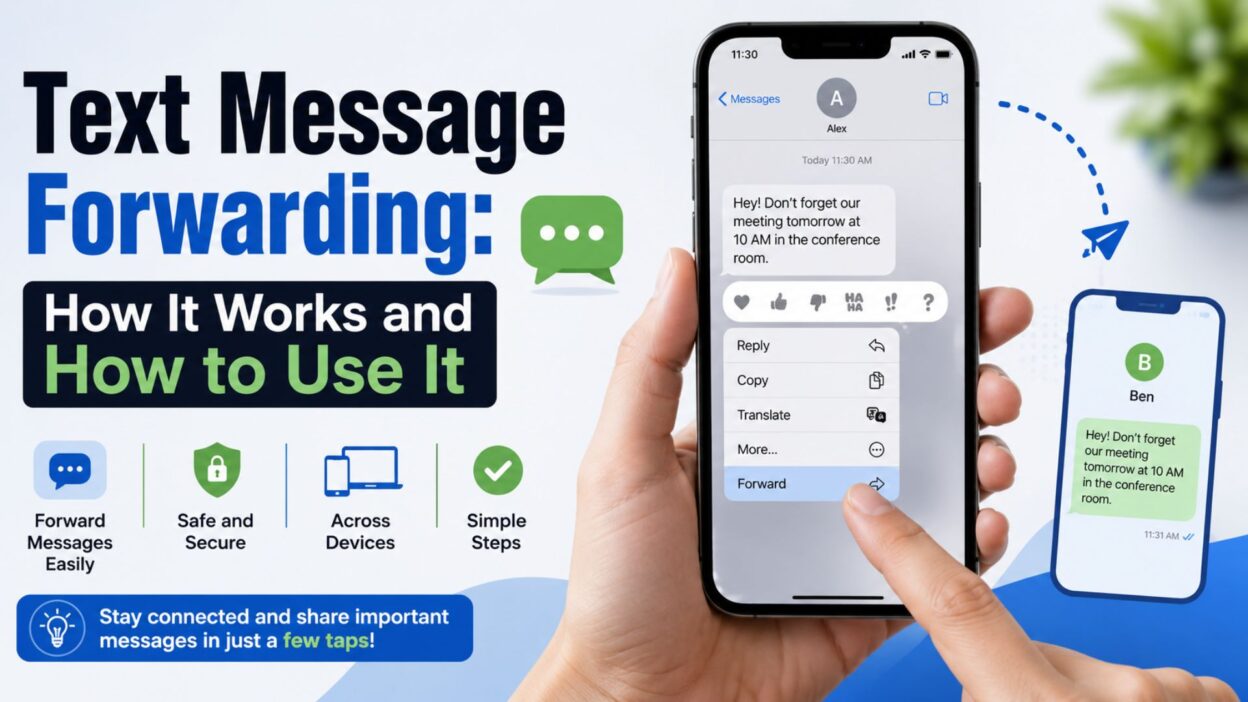
Need to send a text you received to another person or device? Text message forwarding lets you share an SMS or message without typing the entire thing again. Depending on your phone and messaging service, the process can range from a simple tap to a device-specific setting.
The feature can also mean different things. On some phones, forwarding refers to sending one conversation to another contact. Meanwhile, Apple uses related features to let messages appear across trusted devices, while some messaging services offer their own forwarding options.
This guide explains the common meanings of text message forwarding and shows how to handle messages on popular devices. You’ll also learn about automatic forwarding, privacy concerns, common problems, and practical alternatives when your phone does not offer the feature you need.
What Is Text Message Forwarding?
Text message forwarding means sending a message you received to another person, number, or compatible device. Instead of rewriting the original text, you share the existing message directly from your messaging app.
For example, imagine a friend sends you an address by text. You could forward that message to another family member rather than copying the address manually. As a result, forwarding saves time and reduces the chance of typing something incorrectly.
However, forwarding can mean more than one thing. Some people use the term for manual message forwarding, while others mean automatic message forwarding between devices or phone numbers.
Manual vs. Automatic Forwarding
Manual forwarding happens when you choose a specific message and send it somewhere else. It usually takes only a few taps and works directly inside the messaging app.
Automatic forwarding works differently. Instead of selecting each message yourself, a service or device may redirect certain incoming messages automatically. Therefore, automatic forwarding usually depends on the phone, operating system, carrier, or messaging service you use.
How Text Message Forwarding Works
The basic process is straightforward. Your messaging app stores the conversation, and you select the individual message you want to share. Then, the app opens a recipient field so you can choose another contact.
For instance, suppose someone sends you a useful appointment time. You can select that message, choose the forwarding option, pick a contact, and send it. The recipient receives the forwarded content as a new message rather than joining the original conversation.
Keep in mind that the exact buttons vary between apps. Some phones place forwarding under a long-press menu, while others show it after you tap the message. Therefore, if you do not see a forwarding option immediately, check the message’s menu or sharing controls.
How to Forward a Text Message on iPhone
On an iPhone, you can forward an individual message directly from the Messages app. The general process involves opening the conversation, selecting the message, and choosing the forward option.
Steps to Forward a Message on iPhone
- Open the Messages app.
- Select the conversation containing the message.
- Touch and hold the message you want to forward.
- Tap More if the menu appears.
- Select the message.
- Tap the Forward option.
- Enter the contact or phone number.
- Review the message before sending it.
- Tap the send button.
The exact appearance may differ slightly across iOS versions. Still, the basic idea remains the same: select the original message, choose where it should go, and send it.
What About Text Message Forwarding Between Apple Devices?
Apple also uses the term Text Message Forwarding for a feature that can allow SMS and MMS messages received on an iPhone to appear on certain other Apple devices connected to the same Apple Account.
That option is different from forwarding one message to a friend. Instead, it focuses on message access across devices. For example, someone might want their iPhone’s regular text messages to appear on a Mac or iPad so they can respond from another screen.
Because this feature depends on Apple’s device and account setup, the available options may differ depending on your devices and settings.
How to Forward a Text Message on Android
Android phones support message forwarding through many popular messaging apps, although the exact menu depends on the app and phone manufacturer. Google Messages, Samsung Messages, and other apps may present slightly different controls.
Basic Android Forwarding Steps
- Open your messaging app.
- Find the conversation with the message.
- Press and hold the message you want to forward.
- Look for Forward, Share, or a similar option.
- Select the recipient.
- Check the message content.
- Tap Send.
If the forwarding option does not appear, open the three-dot menu or another message-action menu. In some apps, the feature appears only after you select the message.
Forwarding SMS vs. RCS Messages
Modern Android messaging apps may handle SMS, MMS, and RCS differently. SMS usually contains basic text, while MMS supports content such as pictures and group messages. RCS provides additional messaging features when both the service and devices support them.
Even so, forwarding normally depends on the messaging app rather than the message type alone. Therefore, your available options may change when you switch apps or messaging services.
When Should You Forward a Text Message?
Text forwarding can help in everyday situations where someone else needs information you already received. It can also make communication faster when the original wording matters.
Useful Situations
- Sharing an appointment time with a family member
- Sending an address to someone who needs directions
- Passing along an important work update
- Sharing a delivery notification
- Sending event details to a friend
- Forwarding a confirmation number
- Sharing a useful message with a group member
- Passing along information without retyping it
For sensitive conversations, however, pause before forwarding. The original sender may expect their message to remain private. Therefore, consider asking permission when the content contains personal, confidential, or emotionally sensitive information.
How to Forward Multiple Text Messages
Sometimes one message does not contain enough information. In that case, you may want to forward several messages from the same conversation. Many messaging apps let you select multiple messages before choosing a recipient.
Select Several Messages
Open the conversation and press and hold one message first. Then, look for checkboxes or selection controls that let you choose additional messages.
Once you select everything you need, tap the forwarding or sharing option. Next, choose the contact and review the selected content before sending it.
However, not every messaging app supports multiple-message forwarding in the same way. If your app does not offer the option, you may need to forward each message separately or use another sharing method.
How to Automatically Forward Text Messages
Automatic text message forwarding is different from manually forwarding a single message. Instead of selecting a message yourself, an app or service may redirect incoming texts according to rules you configure.
This feature can help when you need messages available on another device or when you manage more than one phone. However, automatic forwarding requires extra care because forwarded messages may contain private information.
Automatic Forwarding on iPhone
Apple’s built-in Text Message Forwarding feature primarily helps you access SMS and MMS messages from other Apple devices. It does not work like a general rule that automatically sends every text to another phone number.
To check the feature, open your iPhone’s Settings and look for the Messages settings related to forwarding or message access across devices. Your Apple Account and connected devices also affect which options appear.
If your goal involves forwarding messages to another phone number automatically, you may need a carrier feature or a third-party service instead. Check the service’s privacy terms before giving it access to your messages.
Automatic Forwarding on Android
Android does not provide one universal automatic-forwarding system across every phone. Instead, available options depend on your messaging app, device, carrier, and any third-party automation tools you choose.
For example, some automation apps can detect incoming messages and perform actions based on specific conditions. However, those tools may request broad permissions, so review their access carefully.
Most importantly, avoid installing an unknown app simply because it promises automatic forwarding. A messaging app with access to SMS can potentially read sensitive verification codes, personal conversations, and other private information.
Text Message Forwarding for Verification Codes
Forwarding verification codes can seem convenient, especially when you use more than one device. Nevertheless, security codes deserve extra caution.
A one-time password or verification code can provide access to an account. Therefore, forwarding that code to another person or an unfamiliar service can create a security risk.
When Forwarding a Code Makes Sense
You might need to move a code between your own trusted devices. Even then, use the safest method available rather than sending the code through unnecessary channels.
For example, if a service supports an authenticator app, passkey, or trusted-device approval, that option may provide better security than forwarding SMS codes.
When You Should Not Forward a Code
Never forward a verification code to someone who unexpectedly asks for it. A legitimate company generally does not need you to disclose a private login code to a stranger.
If someone claims to represent your bank, social network, delivery company, or another service and asks you to send them an SMS code, stop and verify the request through the company’s official contact method.
Text Message Forwarding and Privacy
Forwarding a message also forwards information that someone else may have shared with you. Consequently, the feature creates a simple but important privacy question: Do you have permission to share this message?
A casual joke may not create much concern. On the other hand, medical details, financial information, private photos, passwords, addresses, or personal conversations deserve much greater care.
Think Before You Forward
Before tapping Send, consider who originally sent the message and whether they would expect another person to see it. If the content includes someone else’s private information, ask permission first.
You should also check the recipient carefully. A wrong contact can turn an innocent forwarding mistake into a serious privacy problem.
For work-related messages, company policies may also apply. In particular, confidential business information should stay within approved communication channels.
Why Is Text Message Forwarding Not Working?
A missing forwarding option does not always mean your phone has a problem. Often, the feature depends on the messaging app or the type of message you selected.
The Forward Option Is Missing
First, press and hold the message instead of tapping it once. Some apps hide message actions until you select a specific message.
If the option still does not appear, open the message’s additional menu. Look for options such as Forward, Share, or More.
Your Messaging App Is Outdated
An outdated app can sometimes cause unexpected behavior. Therefore, check your device’s app store and install available updates for the messaging app.
After updating, reopen the conversation and try the process again.
You Are Using a Different Messaging App
Android phones can use several messaging apps, and each app may organize its controls differently. Your phone might also switch between an SMS app and an RCS-enabled messaging service.
Because of that, instructions for one app may not match another. Check the app name first, then look for its specific message actions.
Apple Device Forwarding Is Not Appearing
If you want messages to appear on another Apple device, check that the devices use the appropriate Apple Account and that the required messaging settings are active.
Also, make sure the devices have a suitable internet connection and current software. If the setting still does not appear, restart the devices and review the Messages settings again.
Can You Forward Text Messages to Email?
In some situations, you can copy message content into an email or use an app that supports message sharing. However, a standard phone messaging app may not offer a direct SMS-to-email forwarding button.
If you only need to preserve the information, copying the text into an email can work. For conversations that contain private information, though, consider whether email provides an appropriate level of security.
Why Email Forwarding Can Be Useful
Email may work better when you need to keep a searchable record or share information with someone who does not use the same messaging platform.
For example, a confirmation message might contain details that you want to keep with your travel or work records. In that situation, moving the relevant information into an email can make future access easier.
Can You Forward Text Messages to Another Phone?
Yes, depending on what you mean by forwarding. You can manually forward individual messages to another phone number through your messaging app.
Automatic forwarding to another phone works differently. Your carrier, phone, operating system, or a third-party service may need to support that function.
For regular personal use, manual forwarding usually offers the simplest approach. It also gives you more control over which messages leave your device.
Text Message Forwarding vs. Sharing
Forwarding and sharing may look similar, but they can serve different purposes. Forwarding usually keeps the original message’s content and sends it as a new message to a recipient.
Sharing may offer additional choices. For example, your phone might let you send selected text to email, notes, another app, or a social platform.
Therefore, choose the option based on what you actually need. If another person simply needs the information, forwarding may be enough. If you want to save or organize the content, sharing it with another app could make more sense.
Tips for Safe and Reliable Message Forwarding
A few simple habits can make forwarding easier and safer. Most importantly, review the message before you send it.
- Check the recipient’s name or number carefully.
- Remove private details when they are not necessary.
- Ask permission before forwarding someone else’s sensitive message.
- Avoid sharing passwords and verification codes.
- Keep your messaging app updated.
- Review permissions before installing automation apps.
- Use trusted services for automatic forwarding.
- Double-check group conversations before sending.
- Avoid forwarding confidential work information outside approved channels.
- Delete unnecessary copies of sensitive messages when appropriate.
These small steps reduce accidental sharing while keeping the feature convenient for everyday communication.
Text Message Forwarding for Different Needs
The best forwarding method depends on what you want to accomplish. For a quick conversation, manual forwarding usually works well. Meanwhile, people who need access across several devices may prefer built-in syncing or device-based message access.
Before choosing a method, consider the type of information, the recipient, and the level of privacy involved. That small check can prevent many common forwarding mistakes.
Forwarding Messages for Work
Work messages often contain schedules, instructions, customer details, or internal information. Therefore, forward them only through channels your workplace allows.
If a colleague needs a specific detail, send only the relevant message rather than an entire private conversation. This approach keeps communication focused and reduces unnecessary exposure.
Forwarding Messages Between Family Members
Family members often forward addresses, appointments, delivery updates, and event details. In these situations, manual forwarding offers a quick way to pass along accurate information.
However, family conversations can still contain private details. Check the message before sharing it, especially when another person’s phone number, address, or personal information appears in the conversation.
What Happens When You Forward a Text?
When you manually forward a text, your phone generally creates a new message containing the selected content. The recipient receives that content in your conversation with them rather than gaining access to your original chat.
That distinction matters because forwarding does not normally give the new recipient access to your entire conversation. They see what you actually send.
However, the exact appearance can vary between messaging apps. Some apps may preserve parts of the original formatting, while others may simply insert the text into a new message.
Does the Original Sender Know?
Usually, the original sender does not receive a notification simply because you forwarded their message to someone else. However, the recipient may see information included in the forwarded content, such as names, timestamps, or other copied details.
For that reason, review the message before sending it. A quick check can help you avoid revealing information you did not intend to share.
How to Stop Unwanted Message Forwarding
If you worry that someone could automatically redirect messages from your phone, start by reviewing installed apps and their permissions. Look for unfamiliar apps that have access to SMS, notifications, or other communication data.
On Android, review app permissions through your device settings. On iPhone, check connected devices, account settings, and apps that have access to your information.
Also, protect your phone with a strong passcode and keep your operating system updated. If you suspect unauthorized access, change important account passwords and review your account’s security settings.
Common Text Message Forwarding Mistakes
Forwarding takes only a few seconds, yet small mistakes can cause confusion or privacy problems. Fortunately, most errors are easy to avoid.
Sending to the Wrong Person
A contact with a similar name can lead to an accidental send. Always check the recipient before tapping the final send button.
Forwarding Too Much Information
You may only need one sentence from a long conversation. Instead of forwarding the entire thread, select the specific message that contains the necessary information.
Forgetting Personal Details
A forwarded message may contain a phone number, address, account detail, or private comment. Therefore, read the complete message before sharing it.
Relying on Untrusted Automation Apps
Automatic forwarding can sound convenient, but unknown apps may request access to sensitive messages. Choose trusted software and understand its permissions before enabling any automation feature.
Best Practices for Text Message Forwarding
A simple routine can make message forwarding both convenient and responsible. First, identify exactly what the recipient needs. Next, select only that information and check the destination carefully.
If the message contains sensitive details, consider whether forwarding remains necessary. When possible, remove unnecessary private information before sharing it.
Finally, keep your phone and messaging app updated. Modern messaging services change frequently, so current software can provide better compatibility and security.
Quick Text Message Forwarding Checklist
Before you forward an important message, run through this short checklist:
- Choose the correct message.
- Confirm the recipient.
- Read the full content.
- Remove unnecessary sensitive information.
- Avoid sharing passwords or security codes.
- Check whether the original sender expects privacy.
- Use a trusted messaging app.
- Review the final message before sending.
- Confirm that the message reached the intended recipient.
This simple process takes very little time. However, it can prevent an embarrassing or potentially serious forwarding mistake.
FAQs About Text Message Forwarding
What does text message forwarding mean?
Text message forwarding means sending a message you received to another person, number, or compatible device. You can usually forward a selected message directly from your messaging app.
Can I forward a text message to another phone?
Yes. You can usually manually forward an individual text to another phone number. Automatic forwarding requires additional support from your phone, carrier, messaging app, or another trusted service.
Can I automatically forward text messages?
Sometimes. However, automatic forwarding depends on your device and software. iPhone offers cross-device message access, while Android options can vary by phone, app, and service.
Is text message forwarding safe?
It can be safe when you forward information carefully. However, avoid sharing passwords, verification codes, financial details, or private conversations without a valid reason.
Why can’t I find the Forward option?
The option may appear after you press and hold a message. If it remains unavailable, check the message menu, update your messaging app, or confirm which messaging app your phone currently uses.
Conclusion
Text message forwarding makes it easier to share useful information without rewriting an entire conversation. Whether you want to send an address, appointment detail, delivery update, or important note, manual forwarding usually takes only a few taps.
However, convenience should not replace caution. Always check the recipient, review the message, and think about whether the original content contains private information. In addition, take extra care with passwords, verification codes, financial details, and confidential work messages.
The right approach also depends on your device. iPhone, Android, Google Messages, Samsung Messages, and other services may offer different forwarding and sharing controls. Therefore, if one method does not work, check the specific app and device settings rather than assuming your phone lacks the feature.
Ultimately, good forwarding means sharing only what is needed, with the right person, through a trusted method. A few seconds of careful checking can make text message forwarding faster, safer, and much more reliable.

Awais Bilal is the author of Messagesfy, sharing simple and meaningful messages, quotes, and wishes to help people express their feelings easily.